Three Steps into the World of Valor
It's free. Sign up, get the launcher — and you're in the game.
Launcher
The launcher downloads the game for you or updates a game client you already have installed.
Get the LauncherWhat the launcher can do · Did Windows show a warning? What to click
Windows warns you about the launcher?
The first time you run the installer, Windows may show a blue “Windows protected your PC” window. That's how it greets any new program that not many people have downloaded yet: the launcher doesn't have a paid developer certificate yet. If you downloaded the file from valor.su, it's safe.
- In that window, click “More info” — the link below the warning text.
- A “Run anyway” button will appear — click it.
- After that it's a regular installation: “Next” → “Install”.
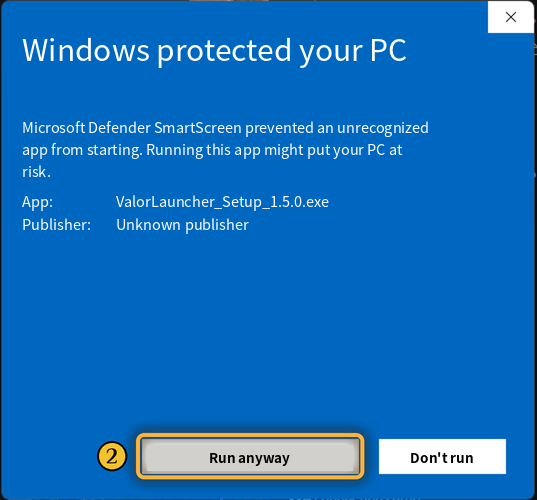
The launcher downloads and installs updates by itself — this window doesn't appear for them. If there's no “Run anyway” button at all, message us on Discord — we'll help.
Other Ways to Download
 ValorLauncher 1.6Windows 7 SP1 – 11 · file checking and resumable downloads
 Launcher LiteFor Windows 7 and 8
 Full Game ClientYandex Disk, as a single archive
 UpdateExtract to \Data\ruRU, replacing existing files
You need our game client to play — a regular WoW 3.3.5a client won't work: the server uses modified game files.
System Requirements
| Minimum | Recommended | |
|---|---|---|
| Operating system | Windows 7 (32-bit) | Windows 11 (64-bit) |
| Graphics card | GeForce GTX 760 2 GB / Radeon RX 560 2 GB / Intel UHD 630 | GeForce GTX 1060 4 GB / Radeon RX Vega 64 or better |
| RAM | 4 GB | 8 GB |
| CPU | Intel Core i5-3450 / AMD FX 8300 | Intel Core i7-6700K / AMD Ryzen 7 2700X |
| Free disk space | 40+ GB (HDD) | 40+ GB (SSD) |